YouTube seeding — overview
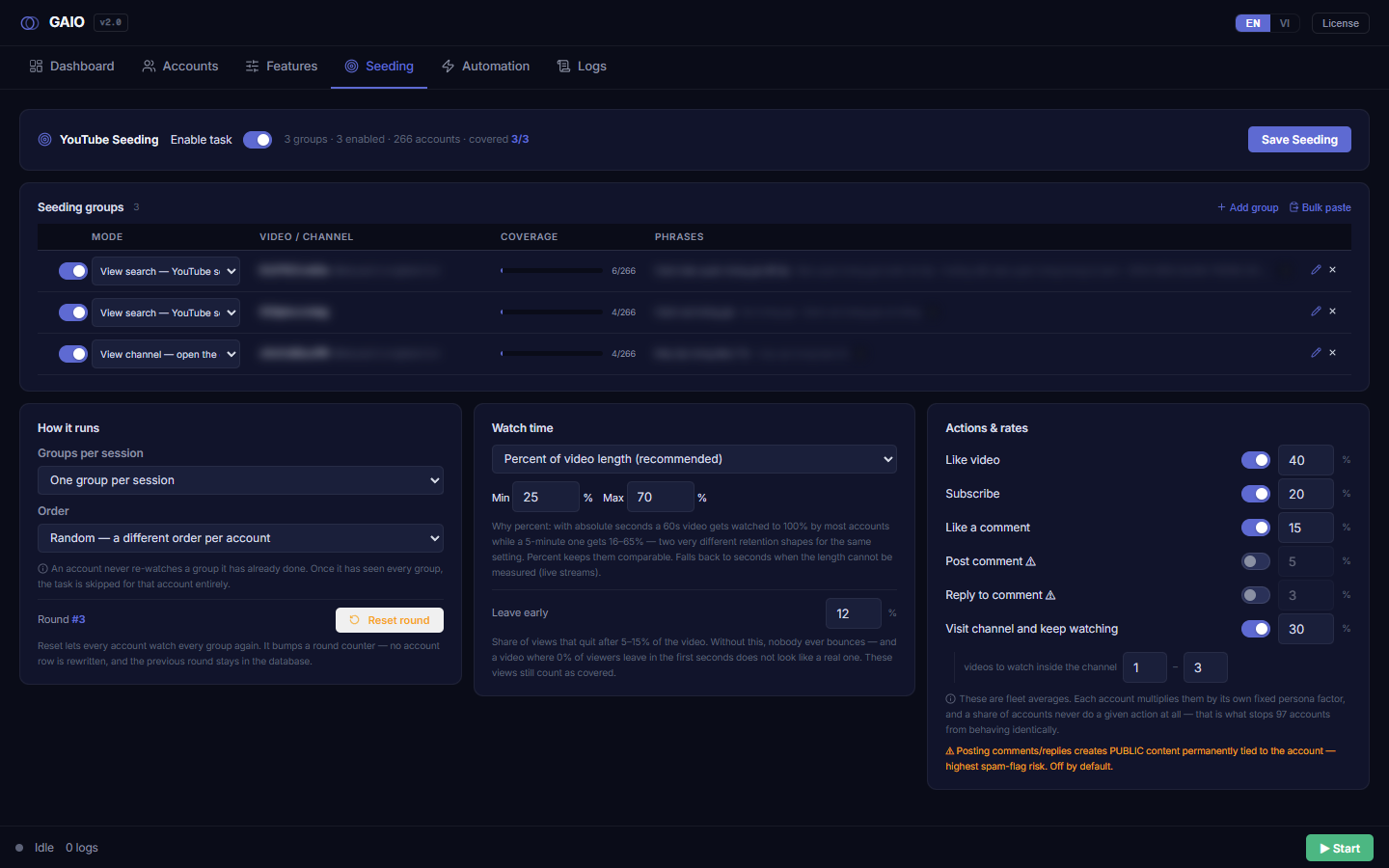
YouTube seeding turns your account fleet into real views for videos you specifically choose. Unlike the Features tab (nurture accounts with generic activity — read mail, browse Search, watch random videos so accounts look alive), the Seeding tab has one job: bring accounts to your exact video through human-looking traffic sources (search, channel, related suggestions, homepage, the Subscriptions feed, or Google) and watch long enough to count as a view.
How seeding differs from Seed (nurture)
| Aspect | Features tab (Seed / nurture) | Seeding tab |
|---|---|---|
| Goal | Generic activity so accounts look natural | Watch your exact videos |
| What is watched | Random, not chosen by you | The video ID / channel you declare in target groups |
| Traffic source | Not important | Core: each group is an entry door (search, channel, related, home, subs, google) |
| Storage | seedConfig | Dedicated keys seedYtTargets / seedYtConfig (kept separate so they never overwrite each other) |
Enable the youtube_seeding task
Right next to the YouTube Seeding title (with a target icon) sits the Enable task toggle. It is the master switch: when ON, the fleet is allowed to run the youtube_seeding task; when OFF, no group below will ever run — no matter how carefully you configure it.
- Find the toggle
Enable task— just right of the page title. - Click it ON — the yellow warning strip below disappears immediately.
- Click
Save Seeding— the toggle alone does nothing until you save. Only after saving isyoutube_seedingactually added to the fleet's task list.
Save Seeding. While the toggle is OFF, a yellow strip shows under the header: "Task is OFF — groups below will not run until you enable it and save."Campaign status summary line
In the header, between the toggle and the Save button, a grey line reads the campaign state live, in the form: <N> groups · <N> enabled · <N> accounts · covered <X>/<N>.
| Field | Meaning |
|---|---|
| groups | Total declared target groups |
| enabled | Groups currently ON (the toggle at the start of each row) |
| accounts | Total fleet size (reported by the backend) |
| covered X/N | Groups watched by at least one account (accent-coloured); only appears once a group exists |
covered count treats a group as covered when any single account has watched it (not full coverage). If the sidecar is not running, the accounts number stays 0.Save Seeding — the single commit point
The Save Seeding button (accent colour, top-right of the header) persists everything on the tab: the group list, the how-it-runs / watch-time / actions config, the master toggle, and each action toggle. While writing it shows Saving…, then a green Saved for 3 seconds.
seedConfig — so clicking Save Features on that tab cannot wipe your Seeding config, and vice-versa. On save, the tool re-reads the round number from the backend right before writing, so saving from a stale screen won't accidentally roll back a Reset round you just did.