OTP pool & recovery phone
The three features below work with the sms222 provider — where you buy a batch of phone numbers for verification up front. Instead of assigning each number to each account by hand, you load the whole batch into a shared pool, and any account that needs a number pulls one from the pool.
1. Shared OTP pool (Pool OTP)
On the Automation tab, choosing sms222 as the OTP Provider reveals an OTP number mode option with two choices:
- Per account (default) — each account uses exactly the OTP Number and OTP Code Link already assigned in the Accounts table. This is the old behaviour, unchanged.
- Shared pool — click Choose file to load the file downloaded from sms222 (one
number|linkper line). The tool counts valid / duplicate / invalid rows and adds them to the pool. The counter below shows how many are free / in use / dropped.
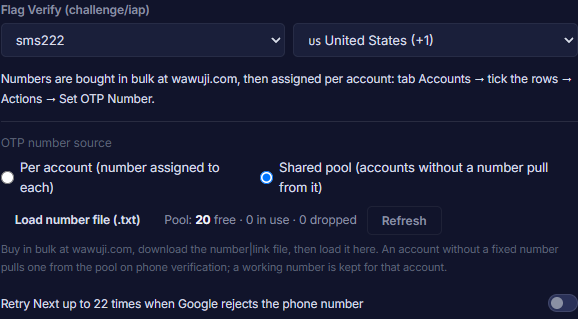
Removing numbers from the pool: Load number file (.txt) only adds new numbers (duplicates are skipped), and Refresh only updates the counts — neither removes any number. To drop numbers, edit the file and click Load & replace pool (.txt): the pool then matches the file exactly (numbers no longer in the file are removed, new ones are added), and the software asks first, showing the counts. It only works while nothing is running (or more than 2 minutes after stopping). Numbers already assigned to accounts are never put back into the pool.
With Shared pool on: an account that has no number of its own and hits the phone-verification step automatically takes a number from the pool in order (first loaded, first used). Outcomes:
- Verified → that number leaves the pool and becomes the account's permanent OTP Number + OTP Code Link (written to the Accounts table).
- Google rejects the number → it moves to the bottom of the pool to retry later; after 2 failures it is dropped for good.
- The code link's token is dead → the number is dropped immediately.
- The pool is empty → that account stops with a clear status; other accounts are unaffected.
The pool is safe under many concurrent threads — no two accounts ever receive the same number. An account that already has its own number keeps using it and never touches the pool.
2. Add Recovery Phone
Enable it on the Features tab. This feature adds a recovery phone number to the account, for sms222. The number source follows the same OTP number mode above:
- Per account → use the account's own OTP Number + OTP Code Link.
- Shared pool → pull a number from the pool; on success the number is added to the account and leaves the pool, on failure it returns to the bottom of the pool.
3. Hidden phone auto-code
When signing in hits the hidden phone verification step: if the account already has an OTP Number + Code Link, the tool fetches the code and clears the step automatically; if the code never arrives or errors out, the status reads Phone Hidden: Code Fail. An account with no number of its own keeps the Phone Hidden status as before.
Bulk Set OTP is unchanged — use it to assign fixed numbers to live Gmail accounts that want a recovery phone. The pool is only the source for accounts that have no number yet to draw from the first time.