Declaring target groups
Each target group is a pair of (video + entry door): you declare a video (or a channel) and choose the path an account takes to reach it. The group list lives in the Seeding groups block just below the header.
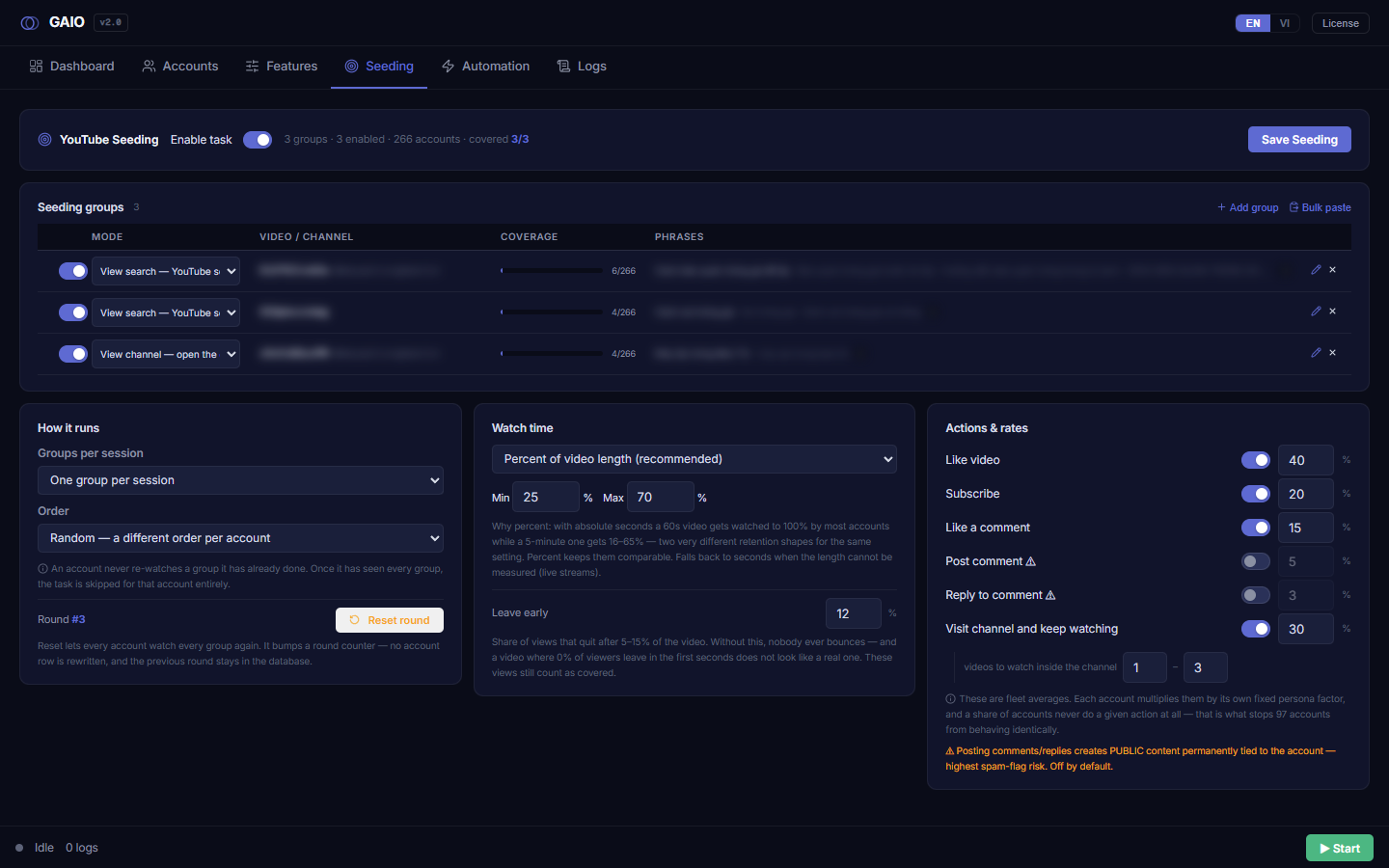
The Seeding groups block: count badge and filter
- Count badge (mono text by the title) — normally shows the total group count; while filtering it shows
matches/total(e.g. 2/12). - Filter box
Filter…— only appears when there are more than 8 groups. Type any fragment of a video ID,@handle, mode name, or a search phrase; the table shrinks to matches. Clear it to see all again.
Two ways to add groups
Add group (the + Add group button, top-right) opens an inline editor panel below the table, Mode preset to View search, fields empty. Bulk paste (the Bulk paste button) opens a paste box to declare many groups at once.
Bulk paste
In the paste box, each group is one block: a header line [mode] <videoID> [@handle], then one search phrase per line. Separate blocks with a blank line; lines starting with # are comments.
| Valid mode token | Meaning |
|---|---|
search | Type a phrase on YouTube then scroll to the video |
channel | Open the channel then find the video inside it |
channel-random | Open the channel, watch a random video (no video ID needed) |
related | Open a seed video of the channel, click the target in related suggestions |
home | Scroll the homepage, click if the video appears |
subs | Find the video in the Subscriptions feed |
google | Search google.com then click the YouTube result |
<n> new (green) · <n> will be updated (grey) · <n> skipped (yellow, with up to 4 reasons). Apply (N) merges by group id: a group with the same id is overwritten, new ids are added — it never deletes groups you did not mention.The columns of a group row
| Column | Function |
|---|---|
| 1 · Enable toggle | Turn one group on/off without deleting it. A disabled group is dimmed ~45% and is not watched. (A real toggle switch, replacing the old coloured dot.) |
| 2 · Mode | A dropdown to pick the entry door right in the table — fast for re-moding 20 pasted videos. |
| 3 · Video / Channel | Shows the video ID (mono) and @handle (grey) if set; a random group shows "random video in channel". A group with the upload-date filter on also carries a small amber chip with the range (Today / This week / This month / This year). Hover for the full value. Display-only. |
| 4 · Coverage | A progress bar + a watched/total accounts count (e.g. 4/266). Green at 100%, accent below 100%. |
| 5 · Phrases | The search phrases; the first is bright, the rest dimmed, with a count badge. Display-only. |
| 6 · Actions | The pencil Edit button and the red X Remove button. |
Save Seeding; leaving the page unsaved and reloading restores it. (Coverage data for that group id stays in the DB.)The Add / Edit editor panel
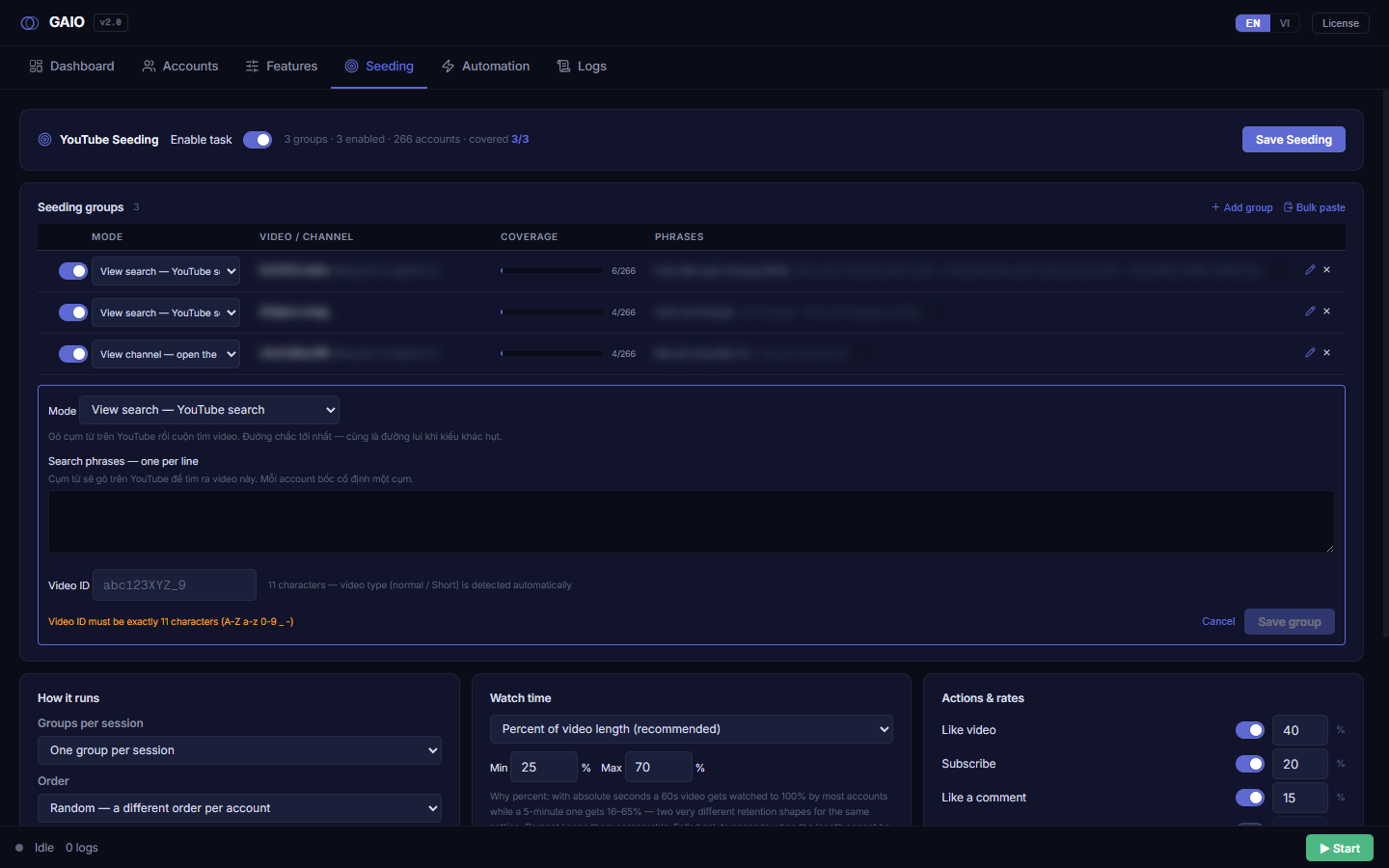
An accent-bordered panel opens below the table (via + Add group or the pencil). It hides fields a mode does not use (deliberately — a shown-but-'don't fill' field gets filled anyway).
| Field | Detail |
|---|---|
| Mode | A 270px dropdown, six entry doors (search / channel / related / home / subs / google), each with a full-sentence description below. Changing mode here resets the "random" checkbox to off. |
| Search phrases — one per line | One phrase per line. The hint above the box changes with the mode: search = the YouTube query; channel/related = the channel name / @handle to type; google = the Google query (use the longest phrase); home/subs = only a fallback query. At least one phrase is required (except random groups). Hidden entirely when "random" is ticked. |
| Channel (marked *) | Shown only for channel/related/subs modes. Type the exact @handle (3–30 chars, letters/digits/._-). Used to verify the account reached the right channel, and as a fallback path. |
| Watch a random video in the channel (checkbox) | View channel only. Ticking makes the account pick a random tab (Videos/Shorts) and a random video; it also hides the phrases and Video ID fields. |
| Video ID | Exactly 11 chars (A–Z a–z 0–9 _ -), placeholder abc123XYZ_9. Leading/trailing spaces are trimmed. Hidden when "random" is ticked. There is no "video type" field — normal/Short is auto-detected. |
| Filter by upload date | Only shown for View search. Five choices: Off — do not filter (default) · Today · This week · This month · This year. After typing the phrase the account opens YouTube's Filters box, picks this range, and only then hunts for the video. Changing mode clears the choice. |
The six modes (entry doors)
| Mode | Path to the video | Needs @handle? |
|---|---|---|
| View search | Type a phrase on YouTube then scroll to the video (surest path, also the fallback) | No |
| View channel | Search the channel name, open it, find the video inside | Yes |
| View related | Open a seed video of the channel, click the target in the "From <channel>" suggestions | Yes |
| View home | Scroll the homepage, click if the video appears (low hit-rate — it means the algorithm already pushed it) | No |
| View subs | Find the video in the Subscriptions feed (only works if the account already subscribed) | Yes |
| View google | Search google.com then click the YouTube result (an external source layer) | No |
Validation, Save group, Cancel
The panel's bottom-left shows a live message: either the first error, or the tip "Tip: 3+ phrases per video so accounts do not all type the same query." When it shows the tip (not a warning) the group is valid. Save group is disabled while any error remains.
| Error that blocks saving |
|---|
| Bad/missing Video ID → "Video ID must be exactly 11 characters" |
| No search phrases (except random groups) |
Malformed @handle |
Missing required @handle for the mode → "<mode> — need @channel" |
| Duplicate — same video AND same mode (same video, different mode is allowed) |
Steps to add one target group
- Click
+ Add group— the editor opens, Mode preset toView search. - Pick a Mode — read the grey description to know that mode's real run flow.
- Enter the Video ID — exactly 11 chars (skip if you ticked "random in channel").
- Enter the Channel — for channel/related/subs, type the exact
@example(the * marks it required). - Type Search phrases — one per line; provide 3+ so accounts don't all type the same query.
- Check the message line — when it shows the tip (not a warning), click
Save group. - Click
Save Seeding— to write to disk. Save group only updates the in-memory list.